
Subcontractor documents, correctly named and filed in your project folders.Straight into Procore. They never sign in. You never rename a file.
You ask a subcontractor for a document. LINTEL chases them until it arrives, names the file the way your organisation already names files, and drops it into the Procore folder you chose.
30 days to decide. If it is not working, we refund in full.
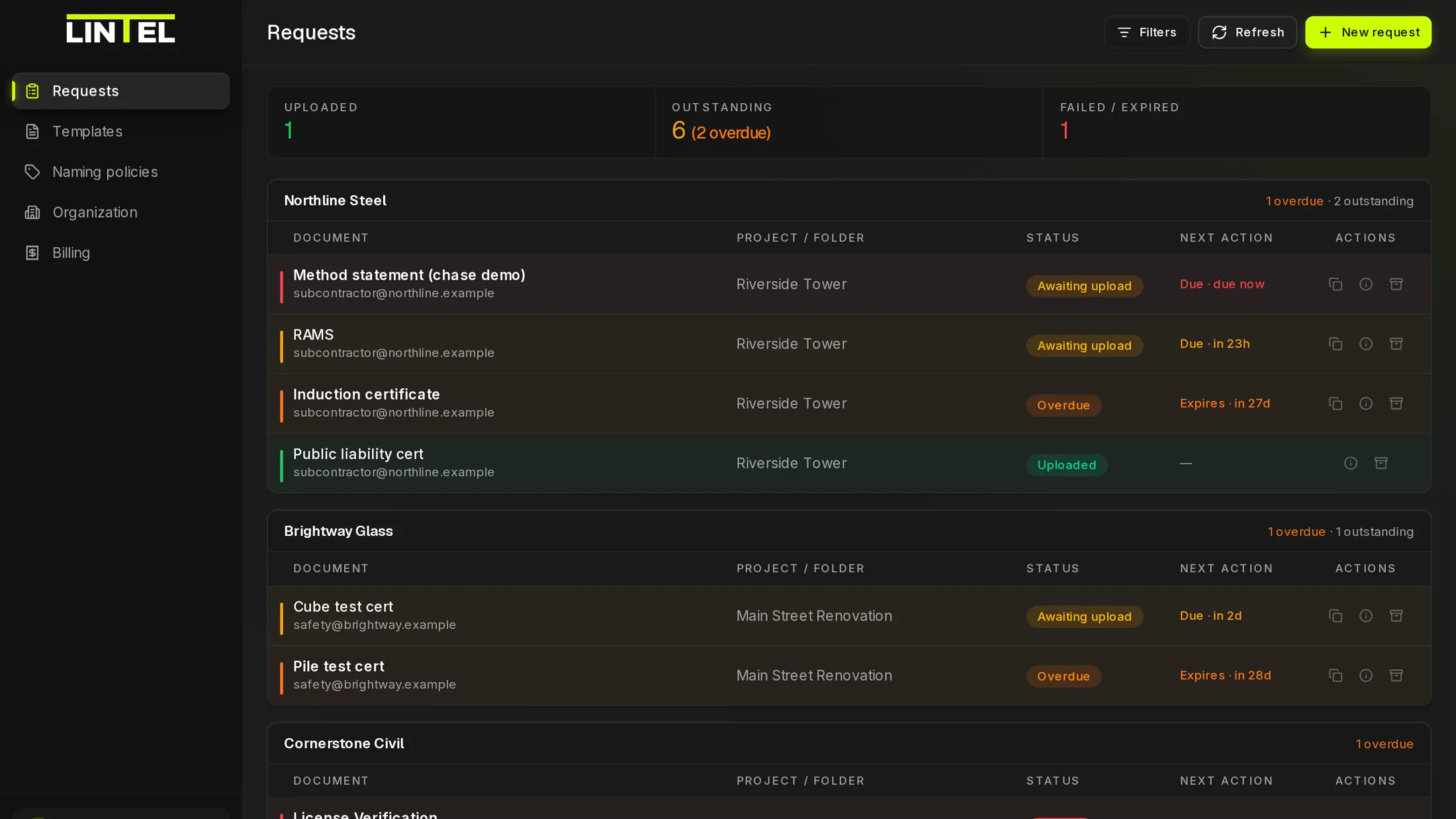
Things you can check yourself
No licence, no account, no app
Recipients open a link and upload. Nothing to install and nothing to join.
You approve the connection in Procore
A company admin authorises LINTEL from inside Procore. We never see or store your Procore password.
Filenames locked before sending
The name is computed from your policy at request time, so the recipient cannot influence it.
DPA and sub-processors published
The UK GDPR Article 28 DPA, our terms, and the full sub-processor list are all on this site.
Read the DPA
Watch it happen once, end to end.
An operator creates a request, a subcontractor uploads from a phone with no account, and the file arrives in Procore under the enforced filename. Recorded on a demo project, in real time.
Procore governs the documents that reach it.
It cannot govern the ones that never do. A subcontractor emails a certificate, and somebody on your team quietly becomes the integration: chasing it, checking it, renaming it, and dragging it into the right folder.
- 01
They will not join another portal
Subcontractors and one-off vendors resist creating an account for a single upload, so the document arrives by email.
- 02
So the naming becomes manual
Whatever the sender called the file is what you inherit, and your convention holds only while somebody keeps fixing it by hand.
- 03
And copies drift out of the record
Files parked in inboxes and personal drives leave gaps that usually surface during an audit.
Four steps, and about fifteen minutes of your time.
- 01
Connect Procore once
A Procore company admin authorises LINTEL through OAuth. Your projects and folders then appear on their own.
- 02
Request the document
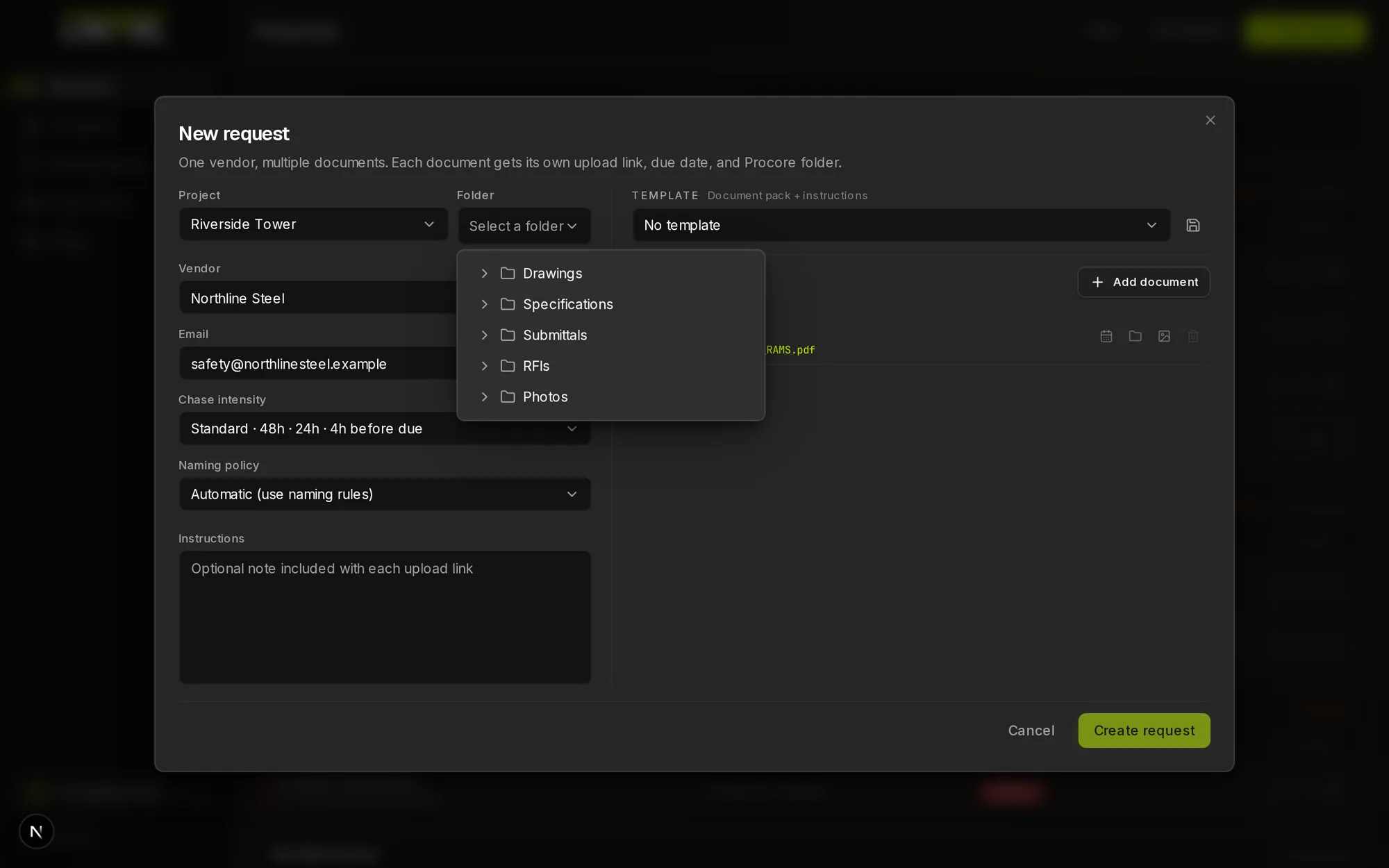
Choose the project, folder, and document label, name the recipient, set a due date. You see the exact filename before it sends.
- 03
They upload from the link
The recipient opens a single-use link on any phone and uploads. No account, no app, and nothing to learn.
- 04
It files itself, and LINTEL chases
The file lands in your chosen folder under the locked filename. Reminders run against the due date until it arrives.
Five things that have to be true before this is worth your time.
Recipient friction
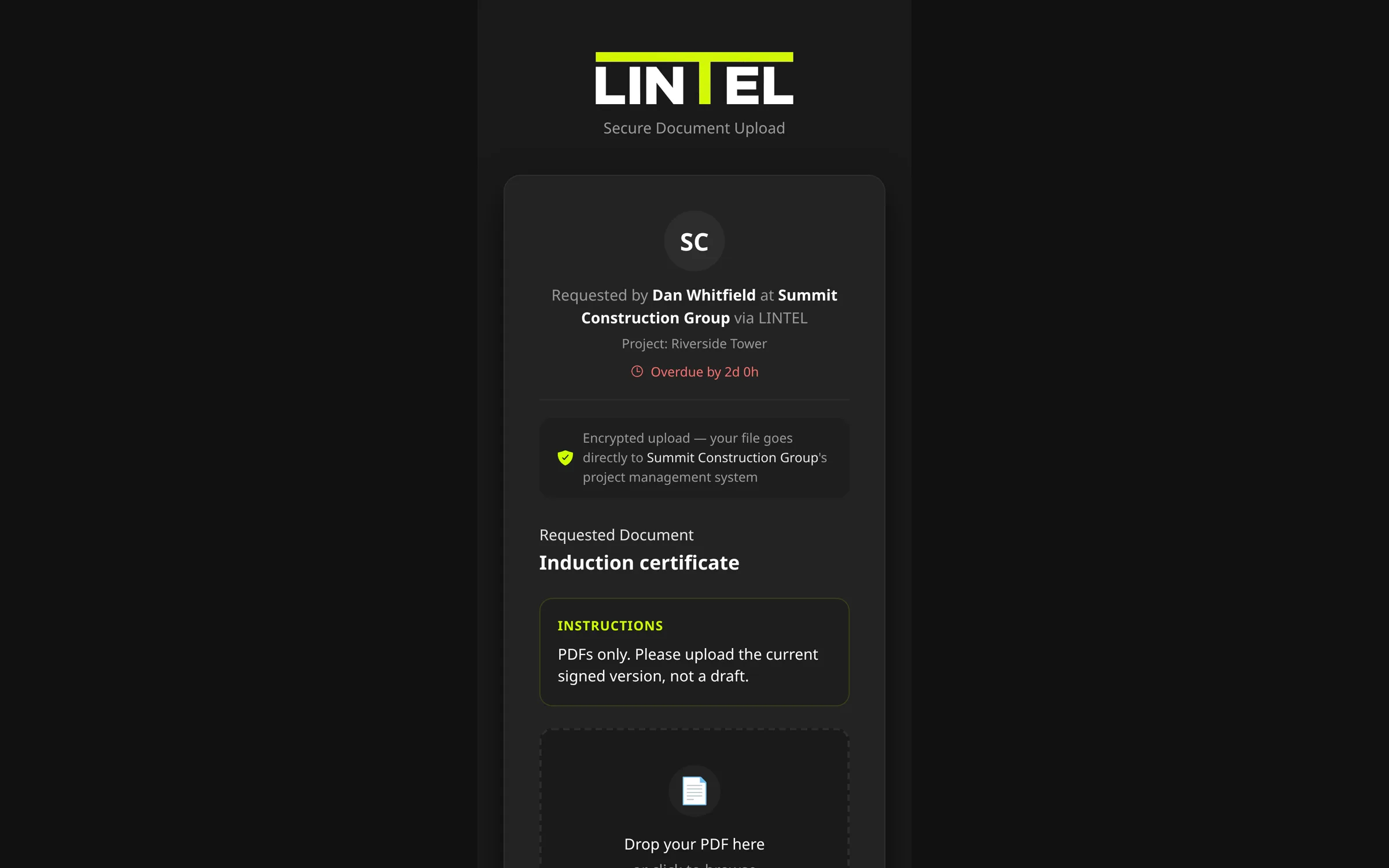
They upload in one tap. No account, no app.
The usual objection to a tool like this is that subcontractors will not adopt another portal. They do not have to. LINTEL sends a single-use link that opens in whatever browser they already have, shows them which document you want, and takes the file. There is no licence to buy on their side and nothing to install.
Naming governance
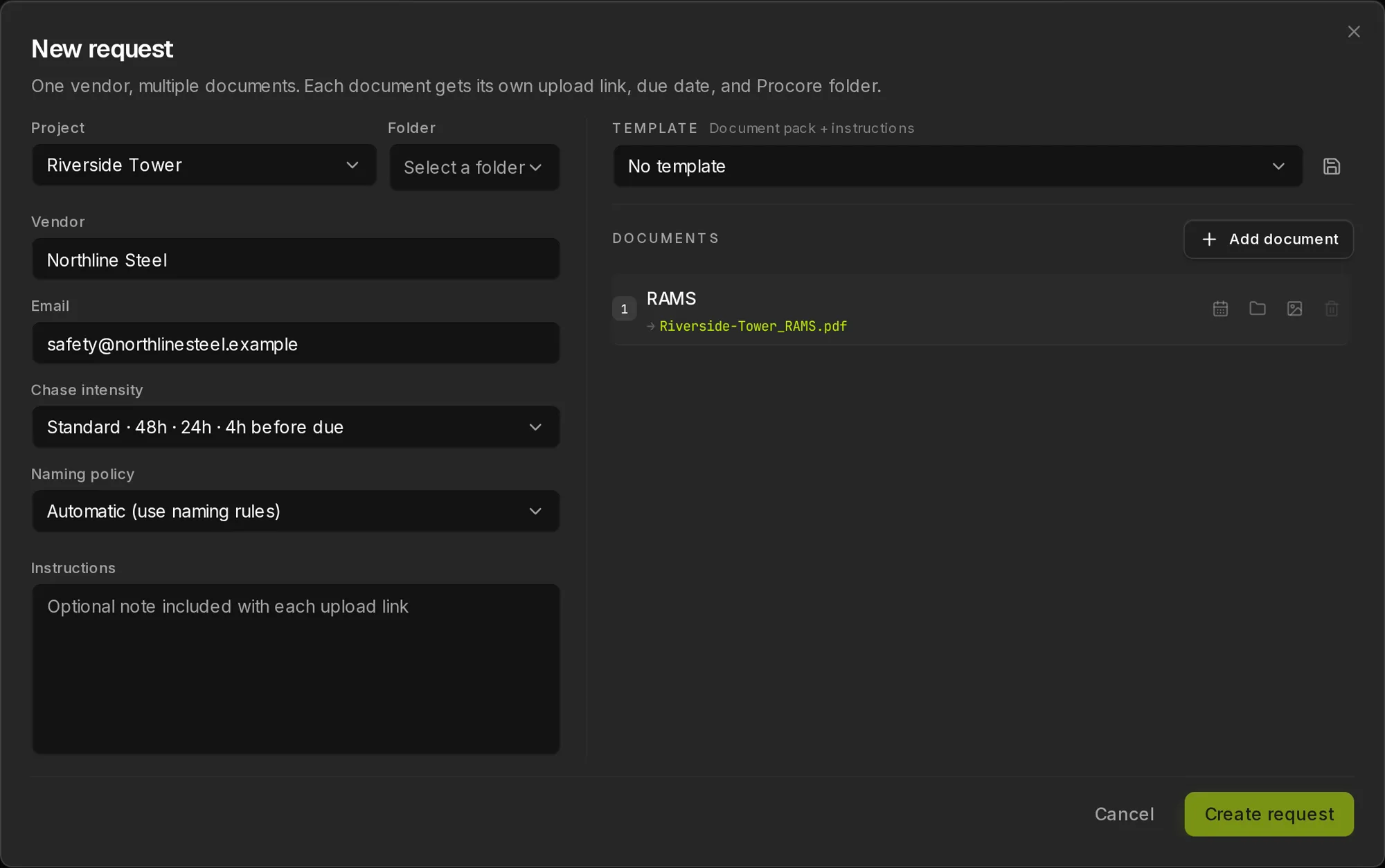
The filename is decided before they ever click.
You define a template once, such as {project_code}_{doc_type}_{vendor}_{date}. LINTEL fills it in from the request, shows you the result before you send, and then locks it. Whatever the recipient called the file on their own desktop is discarded, so nobody has to rename anything after the fact.
Chasing
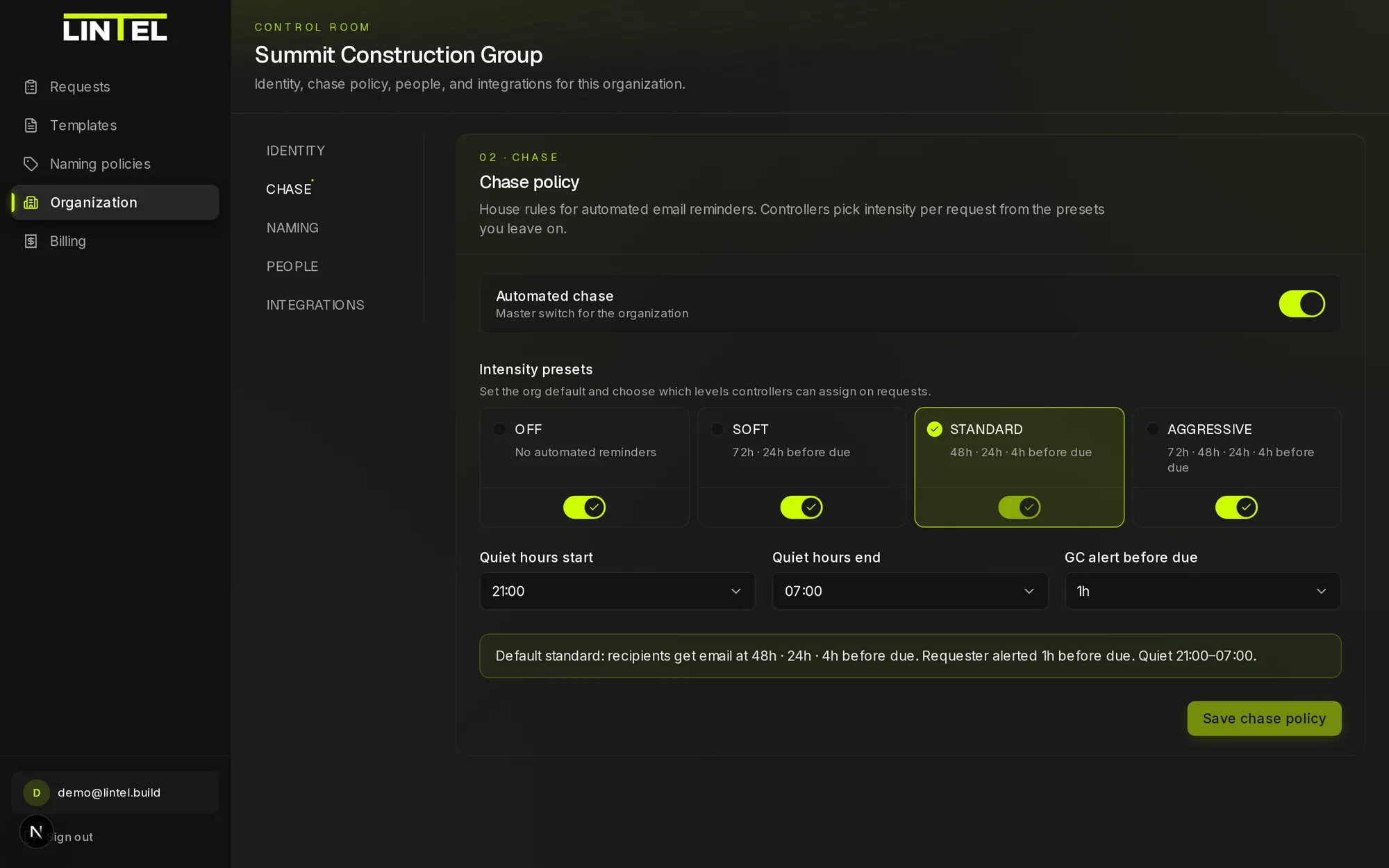
LINTEL does the chasing, on your schedule.
Reminders go out automatically against the due date, inside quiet hours you set, and you can switch chasing off for a single sensitive request. When a request is close to expiring, LINTEL tells your team instead of letting it lapse quietly.
Traceability
It lands in the folder you chose, with a trail.
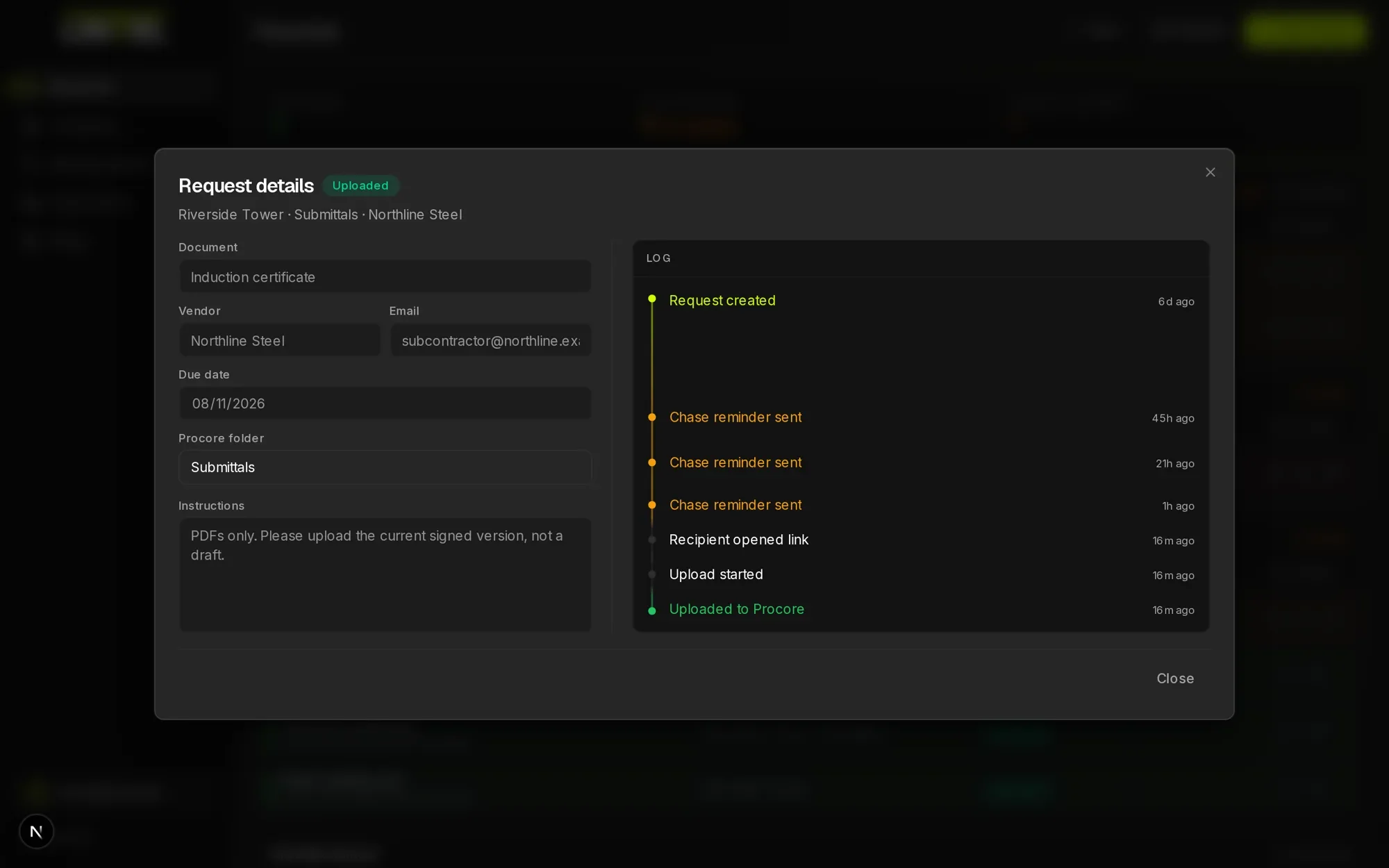
The upload is written into the project and folder you selected, through your own organisation's Procore connection. LINTEL records the document and every event behind it, including each reminder it sent, so you can show when a document was requested, how often it was chased, when it arrived, and which policy version named it. If a file of that name already exists, it goes down the approved new-version path and nothing is overwritten.
Scope
Your document system stays the system of record.
LINTEL is intake and nothing else. Your files stay where they already live, it does not replace Procore, and it is not your approvals workflow or your health and safety platform. It also does not read the document: LINTEL controls the name and the destination, so you still open the file to check it is the right certificate and still in date. Procore is the destination we integrate with today and a Procore account is required for now; other document systems remain on the roadmap.
One payment, ninety days, no subscription.
£395 prepaid for 90 days, with unlimited projects and the full product. Setup is done with you on a call. When it works, you carry on into Core at £316 a month, which is your permanent founder rate.
Send your first requestAfter the pilot, Core is a flat £395 a month for 5 projects, billed per organisation and never per upload. See pricing
- 01
Unlimited projects for the whole 90 days, with no document-type cap. We usually start on one live lane so the result is measurable, but nothing is capped.
- 02
Founder-led setup: the Procore connection, your folder mapping, and your naming policy, configured with you on a call.
- 03
A direct line to the founders while you run it, not a support queue.
- 04
30-day money back: say the word inside 30 days and you get everything back, no questions asked.
Questions we get asked before anyone signs.
Does the subcontractor need a Procore account?
No. LINTEL issues a public upload link for that one document. The recipient needs no Procore licence, no LINTEL account, and no app installed.
Which document system does LINTEL file into?
Procore today. LINTEL is built as an intake layer, so the destination sits behind a connector, but Procore is the only connector available right now and a Procore account is required. Other document systems are on the roadmap and are not shipped.
Who has to authorise the Procore connection?
Someone who can approve an app for your Procore company, which is usually a company admin. They do it once through Procore's own OAuth screen, and LINTEL never receives a Procore password. After that, operators work entirely inside LINTEL.
Are you replacing Procore Submittals or Document Management?
No. LINTEL handles file-and-forget documents such as RAMS (risk assessments and method statements), QA certificates, and training records, which can be accepted and filed without an approval chain. It writes through the Procore Documents API, and we do not claim write-back to Procore's newer Document Management tool.
How does naming governance work?
Policies apply from the most specific match outwards: document type, then folder, then project, then the organisation default. Published policies are versioned, and each request keeps the version that named it, so changing a rule later never rewrites a request that is already open.
What file types can recipients upload?
PDF by default. JPEG can be enabled where you want photo uploads. Anything else is refused before it reaches your folders.
How long does the upload link stay valid?
Each link covers one document. The default due date is seven days after you create the request, and the link keeps working for a 30-day grace period after that date before it expires, so a late recipient can still deliver without you reissuing anything.
Where does our data go?
Your Procore credentials are stored encrypted, every database table is scoped so one organisation can never read another's data, and every sub-processor we use is named in the DPA. Read the DPA, terms, and privacy policy before you sign anything.
What does it cost after the pilot?
Core is a flat £395 a month covering 5 concurrent projects, billed per organisation rather than per upload, so a busy month never changes the invoice. Extra capacity is added in blocks of 5, and anyone who runs the pilot carries on at £316 a month as a permanent founder rate.
How long is setup, and what if it does not work?
About fifteen minutes of your time once your Procore admin has authorised the connection: map your folders, publish a naming policy, send a request. If it is not working, tell us within 30 days and we refund in full, no questions asked.
Why I am selling you a refund promise instead of a case study.
If you look after document control on a live job, you already know the part of the week I mean. A certificate is missing, the person holding it does not work for you, and the only tool you have is a politely worded follow-up.
That work never appears on a project programme, and it always lands on the same person. It is also the one part of the job Procore cannot reach, because it happens before anything gets into Procore.
So LINTEL does one thing. It sits in front of your folders, takes the file off someone who will never log in, names it the way your organisation already names things, and puts it where it belongs. It is not trying to be your CDE, your approvals workflow, or another portal your subcontractors ignore.
I have not sold this to anyone yet. That is why the pilot is £395 with a refund promise and not a page of logos. I do the setup with you, on a call, against your own folder tree. If it is not working, tell me inside 30 days, take your money back, and I will have learned something worth more than the fee.
Send one request. See where it lands.
You do not have to trust the copy on this page. Set up one document type with me and watch a single file arrive in your own Procore folder, named the way your organisation names things.
Send your first request- About fifteen minutes of your time, once Procore is connected.
- Your subcontractor needs no account, no licence, and no app.
- 30 days to change your mind, refunded in full.
Would you rather talk first?
Fifteen minutes, screen shared, against your own folder structure and naming convention. Bring your Procore admin if you can. No deck.